



Enregistreur GPS Avancé : Suivi de Vol en Temps Réel, Surveillance de l'Altitude et de la Vitesse Maximales
Composants et fournitures
| Composant | Quantité |
|---|---|
| Arduino UNO | 1 |
| Barrette de connexion (Jumpers) | 1 |
| Shield de prototypage Arduino | 1 |
| Écran TFT SPI 1,8" avec socket MicroSD (ou équivalent avec carte SD) | 1 |
| Module GPS u-blox NEO-6M | 1 |
Outils nécessaires
- Fer à souder
- Fil à souder sans plomb
- Pince à dénuder/couper (18-10 AWG / 0,75-4 mm²)
À propos du projet
Introduction
Je pratique l'aéromodélisme et j'aime connaître la vitesse et l'altitude de mes avions. Malheureusement, les enregistreurs GPS commerciaux sont très coûteux.
J'ai donc décidé de concevoir un enregistreur de données GPS basé sur Arduino pour un coût inférieur à 50 €.
Mon premier prototype utilise un Arduino Uno R3, un écran Sainsmart ST7735 avec carte SD intégrée et un module GPS NEO 6M V2.
Pour une version ultérieure, j'envisage un Arduino Nano avec un écran OLED SSD1306, le même module GPS et une carte micro SD. L'ensemble, boîtier compris, pèserait environ 40 grammes et s'intégrerait aisément dans un avion de taille moyenne (dimensions : L 50 mm × l 30 mm × H 22 mm). Ce sera mon prochain projet (j'attends le matériel).
Tests
Filmer l'écran d'un Arduino dans une voiture n'est pas aisé, mais j'ai réussi et vous pouvez voir le résultat en vidéo.
Le prochain test se fera avec le nouveau prototype, plus petit et plus léger, sur un avion radiocommandé. À suivre !
Code
Enregistreur GPS (sans carte SD)
#include <SPI.h>
#include <Adafruit_GFX.h>
#include <Adafruit_ST7735.h>
#define cs 10
#define dc 9
#define rst 8
#include <TinyGPS++.h>
#include <SoftwareSerial.h>

Adafruit_ST7735 tft = Adafruit_ST7735(cs, dc, rst);
static const int RXPin = 4, TXPin = 3;
static const uint32_t GPSBaud = 9600;
#define OLED_RESET 5

TinyGPSPlus gps;
SoftwareSerial ss(RXPin, TXPin);

int x = 80, xh = 80;
int maxhigh = 0;
int maxspeed = 0, speed1 = 0;
int high1 = 0;

void setup() {
  Serial.begin(9600);
  ss.begin(GPSBaud);
  tft.initR(INITR_GREENTAB);
  tft.fillScreen(ST7735_BLACK);
  tft.setCursor(5, 58);
  tft.setTextSize(1);
  tft.setTextColor(ST7735_GREEN, ST7735_BLACK);
  tft.print("Initialisation");
}

void loop() {
  tft.setTextSize(1);
  tft.setTextColor(ST7735_GREEN, ST7735_BLACK);

  while (ss.available() > 0) {
    gps.encode(ss.read());
    if (gps.location.isUpdated()) {
      cadre();

      // Latitude / Longitude
      tft.setCursor(5, 44);
      tft.setTextColor(ST7735_GREEN, ST7735_BLACK);
      tft.print("Latitude :");
      tft.setTextColor(ST7735_CYAN, ST7735_BLACK);
      tft.print(gps.location.lat(), 6);

      tft.setCursor(5, 58);
      tft.setTextColor(ST7735_GREEN, ST7735_BLACK);
      tft.print("Longitude :");
      tft.setTextColor(ST7735_CYAN, ST7735_BLACK);
      tft.print(gps.location.lng(), 6);

      // Date
      tft.setCursor(5, 7);
      tft.setTextColor(ST7735_GREEN, ST7735_BLACK);
      tft.print("Date : ");
      tft.setTextColor(ST7735_CYAN, ST7735_BLACK);
      tft.print(gps.date.day()); tft.print(" ");
      tft.print(gps.date.month()); tft.print(" ");
      tft.print(gps.date.year());

      // Heure
      tft.setCursor(5, 20);
      tft.setTextColor(ST7735_GREEN, ST7735_BLACK);
      tft.print("Heure : ");
      tft.setTextColor(ST7735_CYAN, ST7735_BLACK);
      tft.print(gps.time.hour() + 1); tft.print(" ");
      tft.print(gps.time.minute()); tft.print(" ");
      tft.print(gps.time.second()); tft.print(" ");

      // Altitude
      tft.setCursor(5, 80);
      tft.setTextColor(ST7735_GREEN, ST7735_BLACK);
      tft.print("Alt m :");
      tft.setTextColor(ST7735_CYAN, ST7735_BLACK);
      tft.print(gps.altitude.meters(), 0);
      tft.print(" ");

      tft.setCursor(5, 95);
      hmax();
      tft.setTextColor(ST7735_GREEN, ST7735_BLACK);
      tft.print("Alt max :");
      tft.setTextColor(ST7735_CYAN, ST7735_BLACK);
      tft.print(maxhigh);
      tft.print(" ");
      courbeh();

      // Vitesse
      tft.setCursor(5, 115);
      tft.setTextColor(ST7735_GREEN, ST7735_BLACK);
      tft.print("V act : ");
      tft.setTextColor(ST7735_CYAN, ST7735_BLACK);
      tft.print(gps.speed.kmph(), 0);
      tft.print(" ");

      tft.setCursor(5, 130);
      vmax();
      tft.setTextColor(ST7735_GREEN, ST7735_BLACK);
      tft.print("V max : ");
      tft.setTextColor(ST7735_CYAN, ST7735_BLACK);
      tft.print(maxspeed);
      tft.print(" ");
      courbe();

      // Satellites
      tft.setCursor(5, 147);
      tft.setTextColor(ST7735_GREEN, ST7735_BLACK);
      tft.print("Nb Sat : ");
      tft.setTextColor(ST7735_CYAN, ST7735_BLACK);
      tft.print(gps.satellites.value());
      tft.print(" ");

      // HDOP
      Serial.print("HDOP = ");
      Serial.println(gps.hdop.value());

      smartDelay(400);
    }
  }
}

static void smartDelay(unsigned long ms) {
  unsigned long start = millis();
  do {
    while (ss.available()) gps.encode(ss.read());
  } while (millis() - start < ms);
}

void cadre() {
  // Dessin du cadre à l'écran
  tft.drawLine(0, 0, 130, 0, ST7735_RED);
  tft.drawLine(0, 1, 130, 1, ST7735_RED);
  tft.drawLine(0, 158, 130, 158, ST7735_RED);
  tft.drawLine(0, 142, 130, 142, ST7735_RED);
  tft.drawLine(0, 141, 130, 141, ST7735_RED);
  tft.drawLine(0, 107, 130, 107, ST7735_RED);
  tft.drawLine(0, 108, 130, 108, ST7735_RED);
  tft.drawLine(80, 108, 80, 140, ST7735_RED);
  tft.drawLine(81, 109, 81, 140, ST7735_RED);
  tft.drawLine(80, 70, 80, 108, ST7735_RED);
  tft.drawLine(81, 70, 81, 108, ST7735_RED);
  tft.drawLine(0, 159, 130, 159, ST7735_RED);
  tft.drawLine(0, 0, 0, 156, ST7735_RED);
  tft.drawLine(1, 1, 1, 157, ST7735_RED);
  tft.drawLine(127, 0, 127, 156, ST7735_RED);
  tft.drawLine(126, 0, 126, 156, ST7735_RED);
  tft.drawLine(0, 35, 130, 35, ST7735_RED);
  tft.drawLine(0, 36, 130, 36, ST7735_RED);
  tft.drawLine(0, 70, 130, 70, ST7735_RED);
  tft.drawLine(0, 71, 130, 71, ST7735_RED);
}

void courbe() {
  int nouvelleValeur = map(gps.speed.kmph(), 0, 150, 137, 110);
  x++;
  tft.drawPixel(x, nouvelleValeur, ST7735_CYAN);
  if (x > 123) {
    x = 80;
    tft.fillRect(82, 110, 43, 30, ST7735_BLACK);
  }
}

void courbeh() {
  int nouvelleValeurh = map(gps.altitude.meters(), 0, 1000, 104, 72);
  xh++;
  tft.drawPixel(xh, nouvelleValeurh, ST7735_CYAN);
  if (xh > 123) {
    xh = 80;
    tft.fillRect(82, 72, 43, 35, ST7735_BLACK);
  }
}

void vmax() {
  speed1 = gps.speed.kmph();
  if (speed1 > maxspeed) maxspeed = speed1;
}

void hmax() {
  high1 = gps.altitude.meters();
  if (high1 > maxhigh) maxhigh = high1;
}
Enregistreur GPS avec sauvegarde sur carte SD
#include <SPI.h>
#include <SD.h>
#include <Adafruit_GFX.h>
#include <Adafruit_ST7735.h>
#define cs 10
#define dc 9
#define rst 8
#include <TinyGPS++.h>
#include <SoftwareSerial.h>

Adafruit_ST7735 tft = Adafruit_ST7735(cs, dc, rst);
static const int RXPin = 4, TXPin = 3;
static const uint32_t GPSBaud = 9600;
const int cs_sd = 4;
#define OLED_RESET 5

TinyGPSPlus gps;
SoftwareSerial ss(RXPin, TXPin);

int x = 80, xh = 80;
int maxhigh = 0;
int maxspeed = 0, speed1 = 0;
int high1 = 0;

void setup() {
  Serial.begin(9600);
  ss.begin(GPSBaud);
  tft.initR(INITR_GREENTAB);
  tft.fillScreen(ST7735_BLACK);
  tft.setCursor(5, 58);
  tft.setTextSize(1);
  tft.setTextColor(ST7735_GREEN, ST7735_BLACK);
  tft.print("Initialisation");
  tft.setCursor(5, 70);
  tft.print("Init SD");
  delay(1000);

  if (!SD.begin(cs_sd)) {
    tft.setCursor(5, 82);
    tft.print("Defaut SD");
    return;
  }
  tft.setCursor(5, 82);
  tft.print("Carte SD OK");
  delay(1000);
  tft.fillScreen(ST7735_BLACK);

  File data = SD.open("donnees.txt", FILE_WRITE);
  data.println("");
  data.println("Demarrage acquisition");
  data.close();
}

void loop() {
  tft.setTextSize(1);
  tft.setTextColor(ST7735_GREEN, ST7735_BLACK);

  while (ss.available() > 0) {
    gps.encode(ss.read());
    if (gps.location.isUpdated()) {
      cadre();

      // Affichage identique au code ci-dessus (omis pour brièveté)
      // ...

      // Écriture sur carte SD
      String Date = String(gps.date.day()) + " " + gps.date.month() + " " + gps.date.year();
      String Temps = String(gps.time.hour() + 1) + " " + gps.time.minute() + " " + gps.time.second();

      File data = SD.open("donnees.txt", FILE_WRITE);
      data.println(Date + " " + Temps + " " +
        String(gps.location.lat(), 6) + " " +
        String(gps.location.lng(), 6) + " " +
        String(gps.altitude.meters(), 0) + " " +
        String(maxhigh) + " " +
        String(gps.speed.kmph(), 0) + " " +
        String(maxspeed));
      data.close();

      smartDelay(400);
    }
  }
}

// Fonctions smartDelay, cadre, courbe, courbeh, vmax, hmax identiques au code précédent
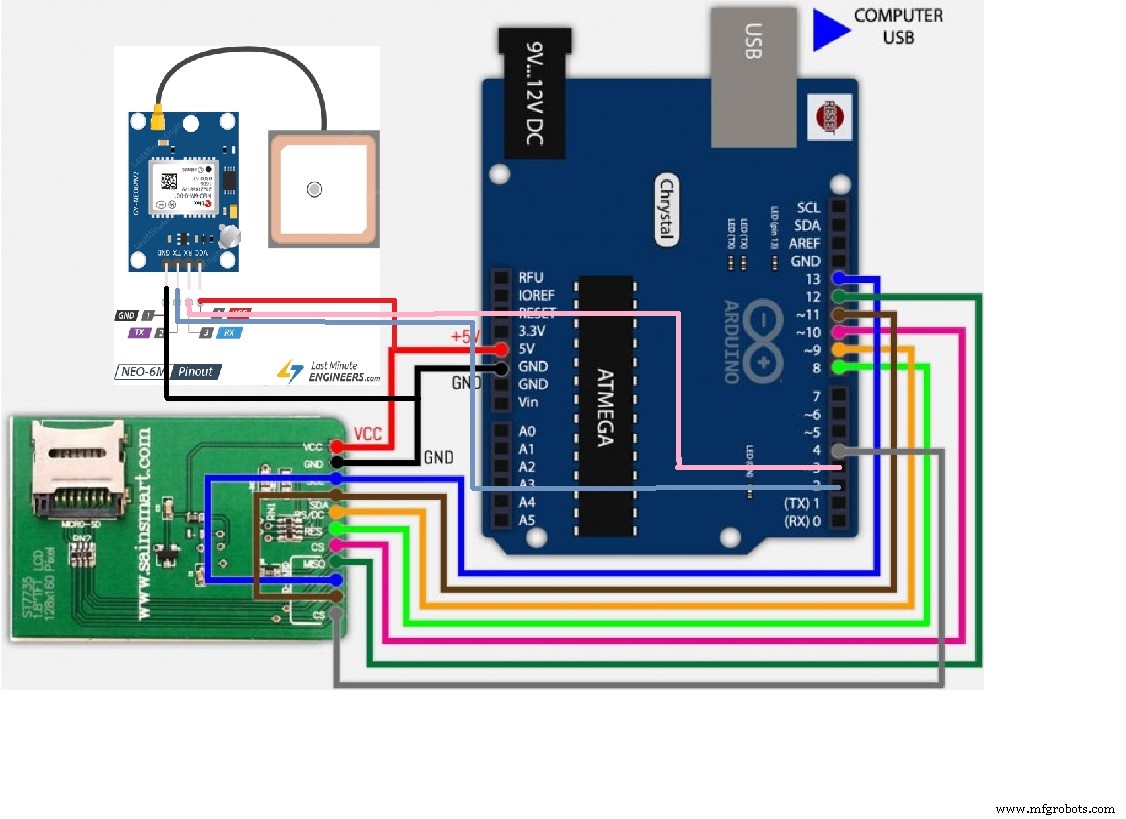
Schéma de câblage
Processus de fabrication
- Construire un système de détection d'incendie rapide et fiable avec Samsung SAMI, Arduino UNO et Raspberry Pi
- Surveillance temps réel de panneau solaire avec Arduino : Acquisition de données bas coût
- Moniteur d'énergie Arduino & Data Logger fiable – Guide complet (Dr. Wattson + carte SD)
- Créer des animations et jeux sur LCD avec Arduino UNO
- Enregistreur de Température et Humidité Arduino avec DHT11 et Shield Ethernet
- Calculatrice basique Arduino UNO - Projet facile pour débutants
- Construire un affichage à persistance rétinienne portable avec Arduino UNO et ATtiny85
- Module GPS u-blox LEA‑6H 02 : guide d'intégration Arduino et Python
- Construire un Cube LED 4x4x4 avec Arduino Uno et 1Sheeld – Projet LED Interactif