



Construire une serrure RFID sécurisée avec Arduino et RC522 (MIFARE 13,56 MHz)
Composants et fournitures
| Arduino UNO | × | 1 |
| Module RFID RC522 | × | 1 |
| Servomoteur TG9e | × | 1 |
| Anneau NeoPixel Adafruit : WS2812 5050 RGB LED | × | 1 |
| Étiquettes RFID (tags) | × | 2 |
À propos de ce projet
Ce tutoriel montre comment réaliser simplement une serrure à badge RFID avec un Arduino UNO et le module RC522 (protocole MIFARE). Le projet complet est aussi disponible sur geek.adachsoft.com.
Étape 1 : Composants
- Arduino UNO
- Module RFID RC522
- Servomoteur TG9e
- LED RGB WS2812 (NeoPixel)
- 2 étiquettes RFID
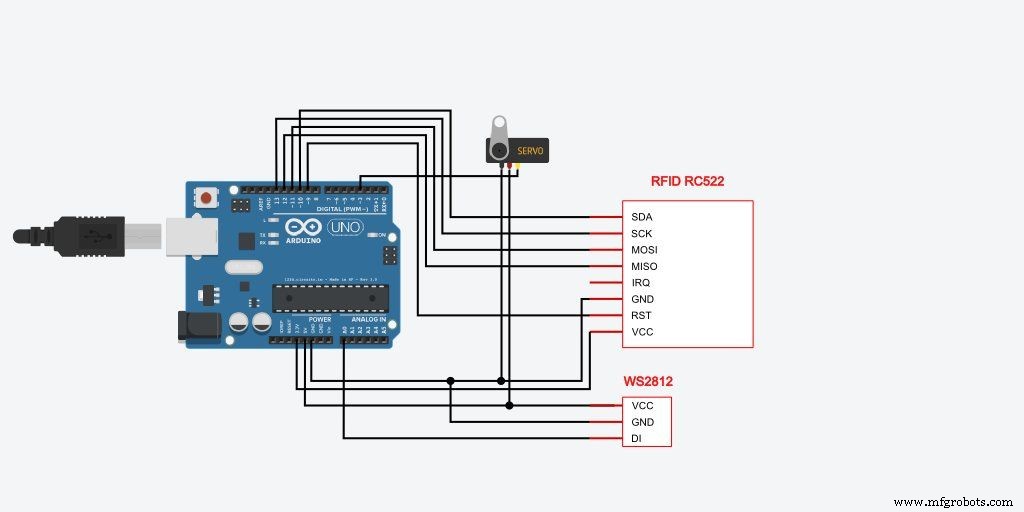
Étape 2 : Schéma de câblage
Étape 3 : Logiciel
Bibliothèques utilisées :
#include <SPI.h>
#include <MFRC522.h>
#include <Servo.h>
#include <Adafruit_NeoPixel.h>
Initialisation :
#define LED_PIN A0
#define SERVO_PIN 3
#define SS_PIN 10
#define RST_PIN 9

Adafruit_NeoPixel pixels = Adafruit_NeoPixel(1, LED_PIN, NEO_GRB + NEO_KHZ800);
Servo myservo;
MFRC522 mfrc522(SS_PIN, RST_PIN);

void setup() {
  Serial.begin(115200);
  SPI.begin();
  mfrc522.PCD_Init();
  Serial.println("Arduino RFID lock");
  myservo.attach(SERVO_PIN);
  myservo.write(0);
  pixels.begin();
  pixels.setPixelColor(0, 32, 32, 32); // Blanc doux au démarrage
  pixels.show();
  delay(500);
  pixels.setPixelColor(0, 0, 0, 0);
  pixels.show();
}
Boucle principale : lecture UID, comparaison, action :
void loop() {
  if (!mfrc522.PICC_IsNewCardPresent()) return;
  if (!mfrc522.PICC_ReadCardSerial()) return;

  String content = "";
  for (byte i = 0; i < mfrc522.uid.size; i++) {
    content.concat(String(mfrc522.uid.uidByte[i], HEX));
    if (i < mfrc522.uid.size - 1) content += "-";
  }
  content.toUpperCase();

  Serial.println("UID tag: '" + content + "'");

  // Remplacez par l'UID de votre badge autorisé
  if (content == "77-39-50-39") {
    Serial.println("Acces autorise");
    myservo.write(90); // Ouverture
    pixels.setPixelColor(0, 0, 32, 0); // Vert
    pixels.show();
    delay(1000);
    myservo.write(0); // Fermeture
    pixels.setPixelColor(0, 0, 0, 0);
    pixels.show();
  } else {
    Serial.println("Acces refuse");
    pixels.setPixelColor(0, 32, 0, 0); // Rouge
    pixels.show();
    delay(500);
    pixels.setPixelColor(0, 0, 0, 0);
    pixels.show();
  }
  delay(1000);
}
Étape 4 : Test final
Approchez un badge autorisé : le servo ouvre (90°), la LED passe au vert pendant 1 s, puis referme. Badge non reconnu : LED rouge 0,5 s.
Code complet (RFID_with_servo.ino)
/* https://geek.adachsoft.com */
#include <SPI.h>
#include <MFRC522.h>
#include <Servo.h>
#include <Adafruit_NeoPixel.h>

#define LED_PIN A0
Adafruit_NeoPixel pixels = Adafruit_NeoPixel(1, LED_PIN, NEO_GRB + NEO_KHZ800);
#define SERVO_PIN 3
Servo myservo;
#define SS_PIN 10
#define RST_PIN 9
MFRC522 mfrc522(SS_PIN, RST_PIN);

void setup() {
  Serial.begin(115200);
  SPI.begin();
  mfrc522.PCD_Init();
  Serial.println("For more: https://geek.adachsoft.com");
  Serial.println("Arduino RFID lock");
  Serial.println("");
  myservo.attach(SERVO_PIN);
  myservo.write(0);
  pixels.begin();
  pixels.setPixelColor(0, 32, 32, 32);
  pixels.show();
  delay(500);
  pixels.setPixelColor(0, 0, 0, 0);
  pixels.show();
}

void loop() {
  if (!mfrc522.PICC_IsNewCardPresent()) return;
  if (!mfrc522.PICC_ReadCardSerial()) return;

  String content = "";
  for (byte i = 0; i < mfrc522.uid.size; i++) {
    content.concat(String(mfrc522.uid.uidByte[i], HEX));
    if (i < mfrc522.uid.size - 1) content += "-";
  }
  content.toUpperCase();

  Serial.println();
  Serial.println("UID tag :'" + content + "'");

  if (content == "77-39-50-39") {
    Serial.println("Authorized access");
    myservo.write(90);
    pixels.setPixelColor(0, 0, 32, 0);
    pixels.show();
    delay(1000);
    myservo.write(0);
    pixels.setPixelColor(0, 0, 0, 0);
    pixels.show();
  } else {
    Serial.println("Access denied");
    pixels.setPixelColor(0, 32, 0, 0);
    pixels.show();
    delay(500);
    pixels.setPixelColor(0, 0, 0, 0);
    pixels.show();
  }
  delay(1000);
}
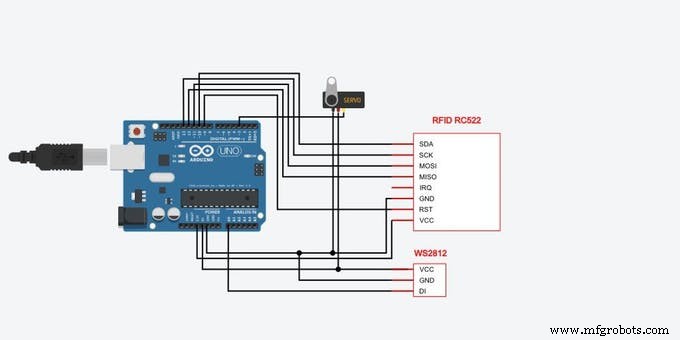
Schéma de câblage
Système d'éclairage DMX piloté par web – Contrôleur maître Arduino
Surveillance temps réel de panneau solaire avec Arduino : Acquisition de données bas coût
Processus de fabrication
- Créer un verrou RFID sécurisé avec Arduino – Guide étape par étape
- Système de pointage RFID fiable avec Arduino et Python (base de données phpMyAdmin)
- Capteur CO2 K30 : Surveillance en temps réel de la qualité de l'air intérieur
- Faciliter la communication sourd-aveugle avec 1Sheeld et Arduino
- Construire une Tirelire Intelligente : Contrôler un Accepteur de Pièces avec Arduino Nano
- Contrôler une LED par Bluetooth avec Arduino et MIT App Inventor
- Intégrer un capteur d'empreintes capacitif DFRobot (ID809) avec Arduino ou ESP8266
- Station météo interactive Nextion HMI avec Arduino Mega et capteurs
- Bras robotique 6 DoF piloté par Nunchuk Wii – Kit Arduino Mega